

Chapter 7 of 12 · min 19:31 to 22:04
What Detrics table groups are and how to review the schema Claude built
Claude creates the Meta and TikTok table groups with ad-level dimensions and metrics. How to review the schema in the Detrics web app and ask for missing fields, like the image URL.
Watch on YouTube (from 19:31) · Spanish audio
Approve the proposed design
With the sampling done, Claude proposes the design: core ad-level dimensions and metrics, daily aggregation, for Meta Ads and TikTok Ads. Whenever there’s a change to the warehouse, Claude confirms the decision with an approval before executing.
This is deliberate: once you’re running on the warehouse, every change can impact everything your agency consumes from it (dashboards, production processes, alerts). With the go-ahead, it creates both groups: Meta with 22 dimensions and 32 metrics, TikTok with 21 and 28.
Review the schema in the web app
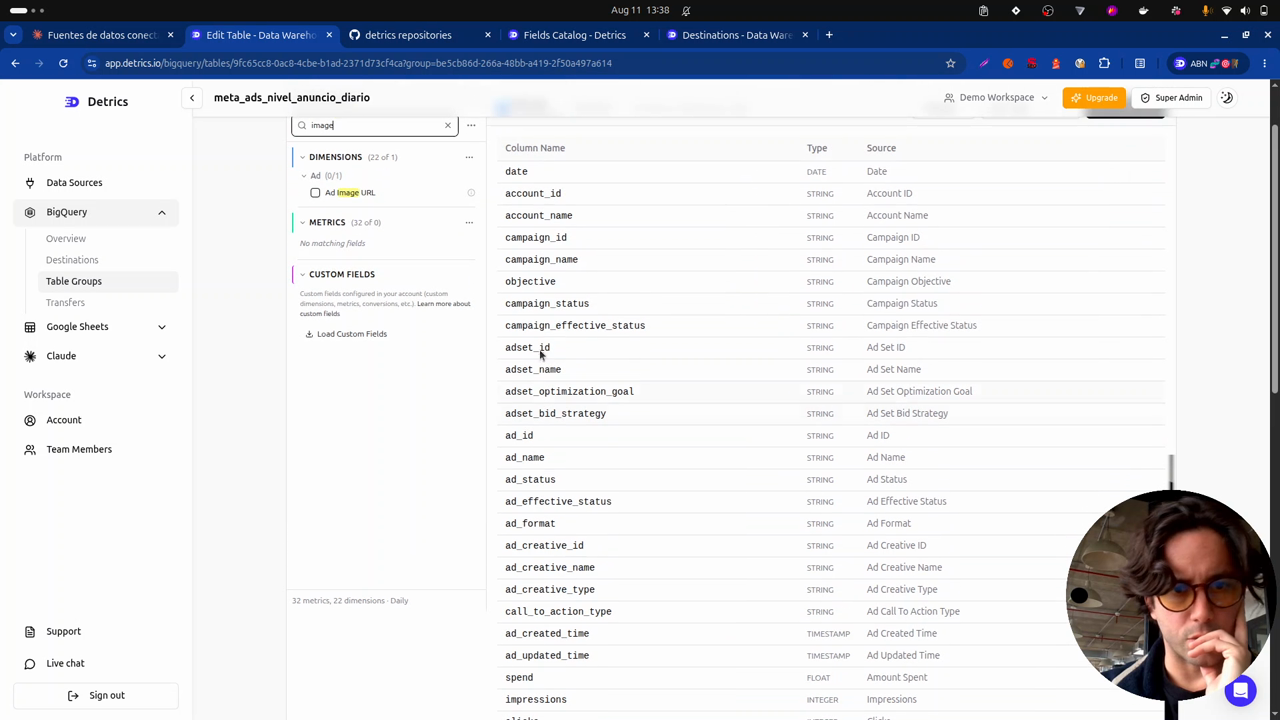
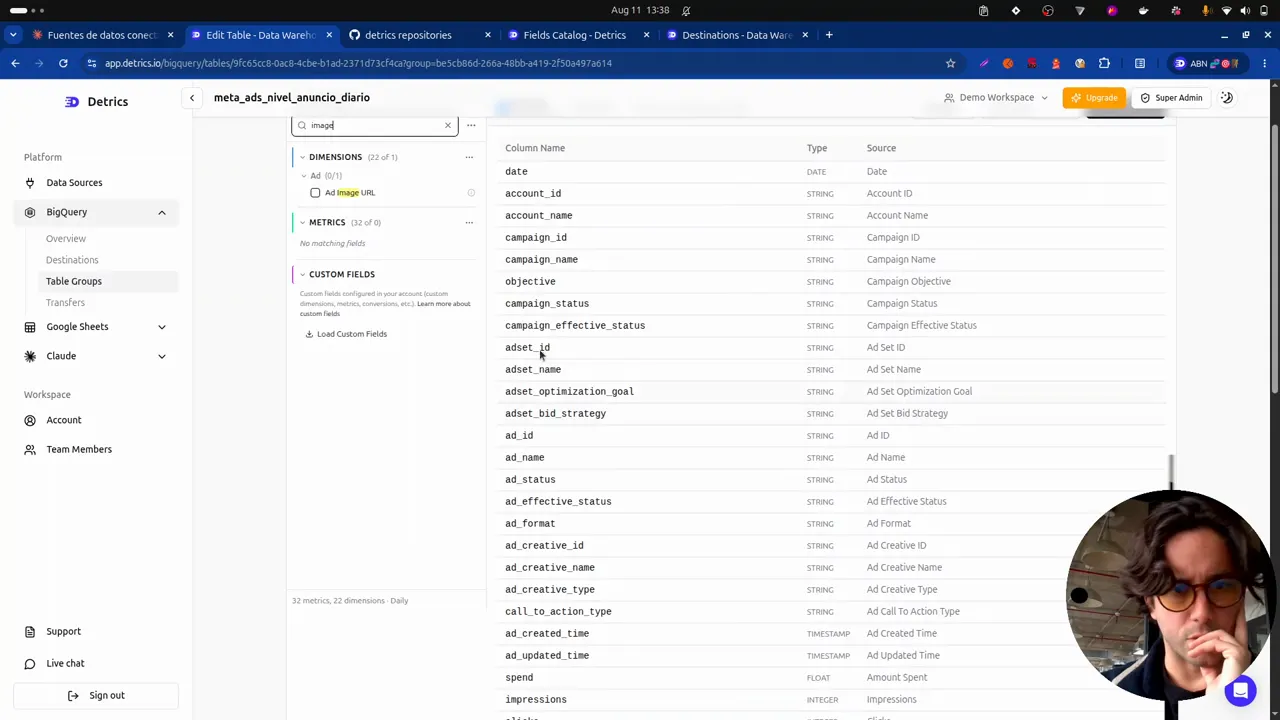
In the Detrics web app, under Table Groups, the two freshly created groups show up: “Meta Ads historical ad level” and “TikTok Ads historical ad level”. Opening each table shows the exact schema: the date field, the relevant dimensions and all the metrics.
Ask for the missing fields
If you know there’s a field you care about, you can check for it and ask. In the video, reviewing the schema reveals a key dimension is missing: the image URL.
Claude, the image URL is missing in Meta. Check whether TikTok is missing it too and add it. And double-check that all the relevant ad-level dimensions are there, also at campaign and ad set level, so the load ends up complete and compatible.
Claude answers (“good catch”), adds the image field on Meta and TikTok, and brings in extra campaign and ad set dimensions. Back in the web app, the new schema shows the image field, one of the most important in this architecture because it’s what stores the creative directly in your cloud.
Frequently asked questions
Why does Claude ask for approval before creating or changing tables?
Because once the warehouse is in place, every change can impact everything that consumes it: dashboards, production processes, alerts. So for any modification to a transfer or table, Claude confirms with the user first.
Can I add fields to the schema Claude designed?
Yes. In the Detrics web app you can review each table group's dimensions and metrics, and ask Claude to add any missing field, like the ad's image URL.
All chapters in this series
- 0:00 1. The problem: ad-level data
- 2:19 2. The solution: warehouse, history and incremental deduplication
- 5:15 3. A look at the final result in BigQuery
- 8:27 4. Step one: connect Claude to Detrics via MCP
- 11:02 5. Step two: explore the sources and design the data schema with Claude
- 13:51 6. How the Detrics warehouse works
- 19:31 7. The table groups created in Detrics
- 22:04 8. Step three: create the destination in your own Google Cloud
- 25:27 9. Step four: transfers and the historical load
- 30:53 10. The data in BigQuery: tables, rows and creatives in your bucket
- 33:19 11. Analyzing the data with Claude and the BigQuery MCP
- 37:41 12. Final step: the unified Meta + TikTok view
Want to build this with your own data?
